

WhatsApp order management for a small shop means getting every order out of the chats and into one list: name, phone, item and size, price, address with pincode, and payment and dispatch status. You still chat with customers yourself. Nothing in this guide replies for you. It just stops orders from getting lost.
Picture your chikankari kurta boutique in Lucknow during Diwali week. (A typical example, not a real shop.) You post six new kurtas on Instagram at noon. By evening there are 52 unread DMs and 31 WhatsApp chats.
One customer asked for the white kurta in M, then switched to L in a voice note. Another sent her delivery details three days ago, somewhere above a long chat about colours. Two customers are both called Priya. One of them paid. Your son took some orders on his phone while you were at the counter.
At 11 pm you open a notebook and start copying orders out of WhatsApp. Around order 19 you realise you can’t find who asked for the peach one.
Why do orders get lost in Instagram DMs and WhatsApp chats?
Because a chat’s a conversation, not an order record. You can’t sort it, total it or hand it to a courier.
In a chat, one order is spread over many messages. The product is in one message, the size in another, the address turns up two days later, and the payment screenshot comes on WhatsApp while the order started on Instagram. Nothing holds those pieces together except your memory, and by Dhanteras your memory’s full.
Then add the usual complications:
- Two or three phones answering customers, because your team is family: yours, your son’s, maybe the shop’s old Android.
- Chats that get archived, muted or pushed down by 40 new messages.
- Customers who change their mind after you’ve written the order down.
- Voice notes you can’t search.
None of this is carelessness on your part. Chat apps were built for talking, and a busy dukaan uses them for talking, selling, billing and delivery tracking all at once.
Is this only a problem for big sellers?
No. It hits small businesses first, because you’re the ones with the least help. Boutiques that take chat orders should also read boutique inventory management.
A 2024 study by LEAD at Krea University and nasscom foundation surveyed 792 rural women entrepreneurs across 24 districts. 83.2% had done some business through social media. Yet for sales and inventory, about half kept records by hand, around 27% relied on memory, and only about 2% used digital records. 52.3% said they found managing online sales difficult: IFMR LEAD study on social commerce (September 2024).
That study covers rural, women-led micro businesses, not every shop in India. But if you sell through WhatsApp and DMs, the pattern will feel familiar: lots of selling on social media, very little of it written down in one place.
What does a lost order actually cost a small shop?

It rarely shows up as one big loss. It leaks out ₹200 and ₹500 at a time.
- Wrong size or colour shipped. You pay courier charges both ways, say from Lucknow to Pune and back, and you lose the sale.
- An order forgotten. The customer waits, messages twice, then leaves a bad comment or quietly never comes back.
- Paid but not shipped. The most embarrassing one, and it’s easy to do in the rush.
- Shipped but not paid. You took a screenshot to mean money. The Hindu has reported cyber police advising traders not to rely only on payment screenshots, because they can be manipulated: The Hindu report. Our guide on how to identify fake UPI payment covers the check.
- Your own time. An hour a night scrolling messages is an hour you didn’t spend sourcing stock or resting.
What are shops doing today to keep track?
If you’re like most sellers, you’ve tried one of these:
- A ₹40 notebook where orders are copied from chats.
- A spreadsheet on your phone.
- Starring messages or pinning chats.
- A folder of payment screenshots.
They hold up until volume spikes, usually around Navratri. The weak point is always the same: every order gets typed twice, once by the customer in the chat and again by you in the book. Manual copying is where errors creep in: a wrong pincode, a wrong size.
For “who paid”, the only reliable answer is still your own bank app. NPCI’s safety tips ask people to switch on SMS and app alerts for every transaction and review them: CNBC-TV18 report. That helps, but matching 30 alerts to 30 chats by hand is slow.
What should every order record contain for WhatsApp order management?

Whatever you use, a notebook, a sheet or an app, each order needs these six things in one place:
- Customer name and phone number
- What they ordered, including size or colour
- Quantity and price
- Full delivery address with pincode (226001 isn’t 226010)
- Payment status: paid, cash on delivery, or pending
- Dispatch status and tracking number
If any of these lives only inside a chat, you’ll be scrolling for it at 11 pm.
How do you move customers from chat to a link without sounding rude?
Keep chatting. Your customers like asking questions, and that personal touch is why they buy from you. Just let the link do the writing down. A store link comes from an online store without a website, with no developer needed.
Something like: “Didi, this link has the kurta with photos and price. You can pay by UPI, card or COD, and your address comes straight to me, so nothing gets missed. I’ll confirm once it’s packed.”
Put the link in your Instagram bio and send it on WhatsApp whenever someone says “I want this one”. You’ll find most customers are relieved they don’t have to type their address again.
WhatsApp orders lost in chats are one of three places a shop selling on WhatsApp and Instagram loses money. The other two are payment proof you can’t trust and counter bills kept apart from online orders.
How do you manage WhatsApp, Instagram and website orders together?
Three doors, one list. You don’t close any door. Only the writing down moves to one place. If Instagram is your busiest door, our guide to selling on Instagram without a website covers DMs, order forms, the store link and a daily order routine. Before the festive rush, see these Diwali sale ideas for online orders.
Here’s a routine that works for a typical small shop (an example, not a real one):
| Time | What you do | Where it ends up |
|---|---|---|
| Opening, 10 minutes | Read new website orders first, since the order details and payment are already in. Then WhatsApp, then Instagram DMs. | Website orders are already in your list. |
| Through the day | When a chat turns into “I want this”, send the product link. If the customer won’t use links, write the order in your order book with all six fields above. | Link orders land in the list. Book orders wait for the evening. |
| After lunch | Pack everything paid or confirmed COD. Print labels in one go and send each customer a dispatch confirmation. | Dispatch status filled in. |
| Closing, 10 minutes | Copy the day’s book orders into the same list or sheet, mark what shipped, and hide anything that sold out at the counter. | One list for tomorrow. |
If you keep a WhatsApp order form in your status or catalog, make it ask for the same six things. A WhatsApp order tracker can be as plain as a sheet with those six columns and a status column: new, paid, packed, shipped, delivered.
On the WhatsApp Business app you can tag chats with labels such as “new order”, “paid” and “shipped” to see where each one stands. WhatsApp’s help centre says labels are being turned into lists, so your app may show lists instead. Either way, they help you find conversations. They don’t replace the order list.
How does Indi Andaz keep every order in one list?
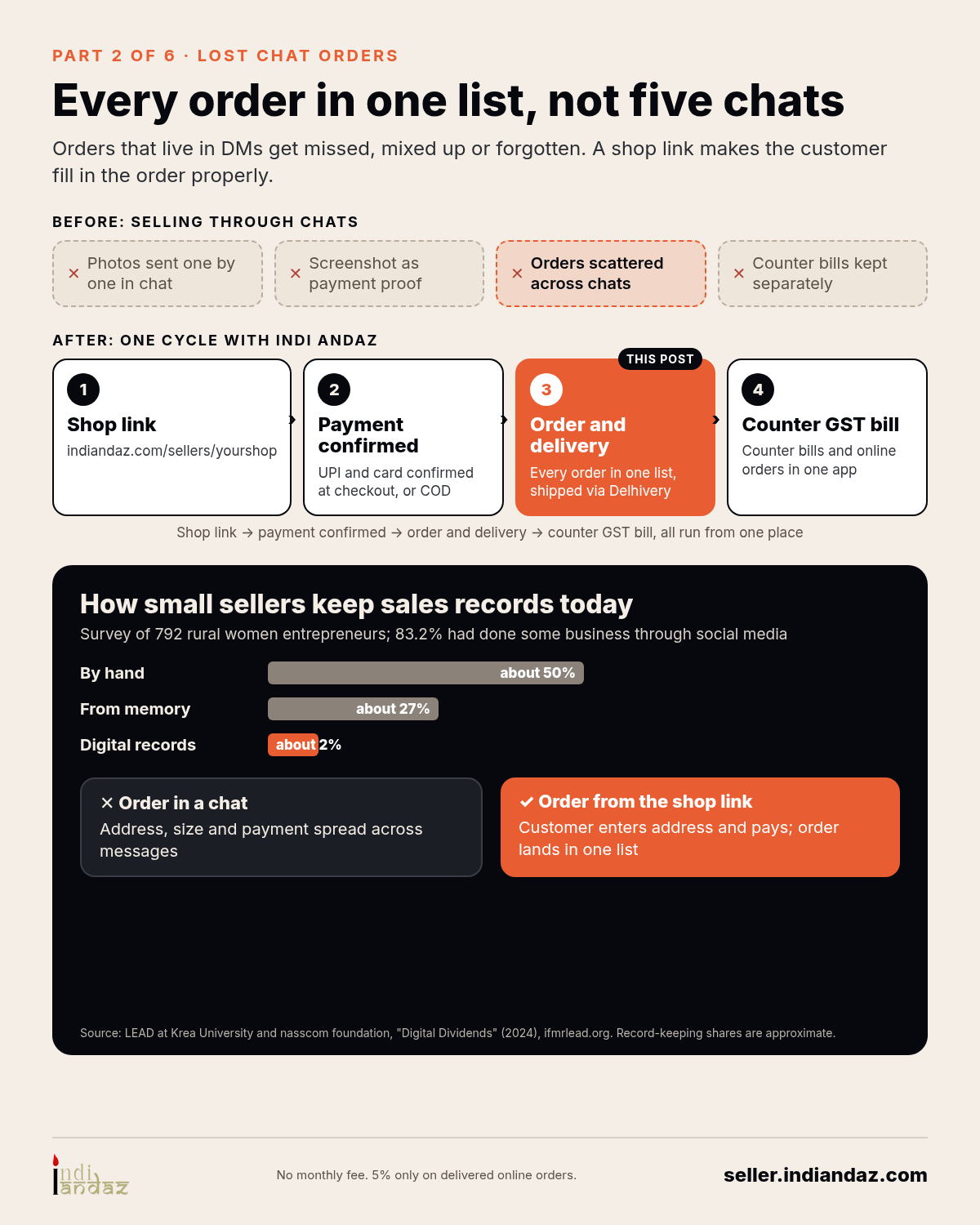
Indi Andaz gives your shop a branded online store with a link like indiandaz.com/sellers/yourshopname.
- The customer places the order. They choose the product, fill in their own delivery details, and pay by UPI or card, or pick cash on delivery. For UPI and card, payment is confirmed at checkout.
- Every order lands in one list. The Seller Portal on the web and the Partner app on Android show each order with its delivery details and order status. No copying from chats.
- Delivery goes through Delhivery. Shipping is charged separately.
- Walk-in sales stay in the same app. The Counter app does GST billing at the shop, so counter bills and online orders sit in one app. Counter stock and online stock are kept separate today.
To be clear about what it doesn’t do: Indi Andaz doesn’t read your DMs or reply for you. You still talk to customers yourself. The store link just makes sure the order’s recorded properly.
Pricing: no monthly fee, 5% only on delivered online orders, payment processing included. GST applies on the fee. For example, the fee is ₹50 on a ₹1,000 product. Delhivery shipping is charged separately.
What won’t one order list fix?
- Some customers won’t click links. Your older regulars may still prefer to order by message. That’s fine. Keep noting those manually.
- COD refusals still happen. A clean order list won’t stop a customer from refusing a parcel at the door.
- Questions still need answers. Size doubts, colour doubts and “is it pure cotton?” still come to your phone, and you still reply.
FAQ: WhatsApp order management
Do I have to stop taking orders on WhatsApp and Instagram?
No. Keep chatting there; it’s where your customers already are. Send the store link when a customer is ready to buy, so the order details and payment are recorded together.
How do I manage orders on WhatsApp Business?
Keep one list with name, phone, item and size, price, address with pincode, and payment and dispatch status. Use chat labels (or lists, where WhatsApp has switched them) to see which conversations are waiting, and send a product link when someone is ready to buy so the order records itself.
Is Indi Andaz a WhatsApp order management system?
On WhatsApp, Indi Andaz does not read or answer your messages. It gives you a store link and one list of orders with delivery details and payment status, and you keep replying to customers yourself.
What does it cost to use the store link?
No monthly fee, 5% only on delivered online orders, payment processing included. GST applies on the fee, and Delhivery shipping is charged separately.
New here? Start with our Start here page.
About Indi Andaz Indi Andaz by Prilix Labs gives Indian shops an online store with UPI, card and COD checkout, plus GST billing at the counter. No monthly fee, 5% only on delivered online orders, payment processing included. GST applies on the fee. Based in Ashoknagar Kalyangarh, West Bengal. Start selling
Cover photo: Jakub Zerdzicki / Pexels (stock photo). Inline photos: Liza Summer / Pexels (stock photo); Tima Miroshnichenko / Pexels (stock photo). Infographic: Indi Andaz.


Leave a Reply